

November 15, 2025 · 12 min read
How to Build Agentic AI Workflows: A Production Guide for 2026
Learn how to design and deploy agentic AI workflows that automate complex multi-step tasks — from architecture decisions to production pitfalls. A practical guide for engineering teams in 2026.
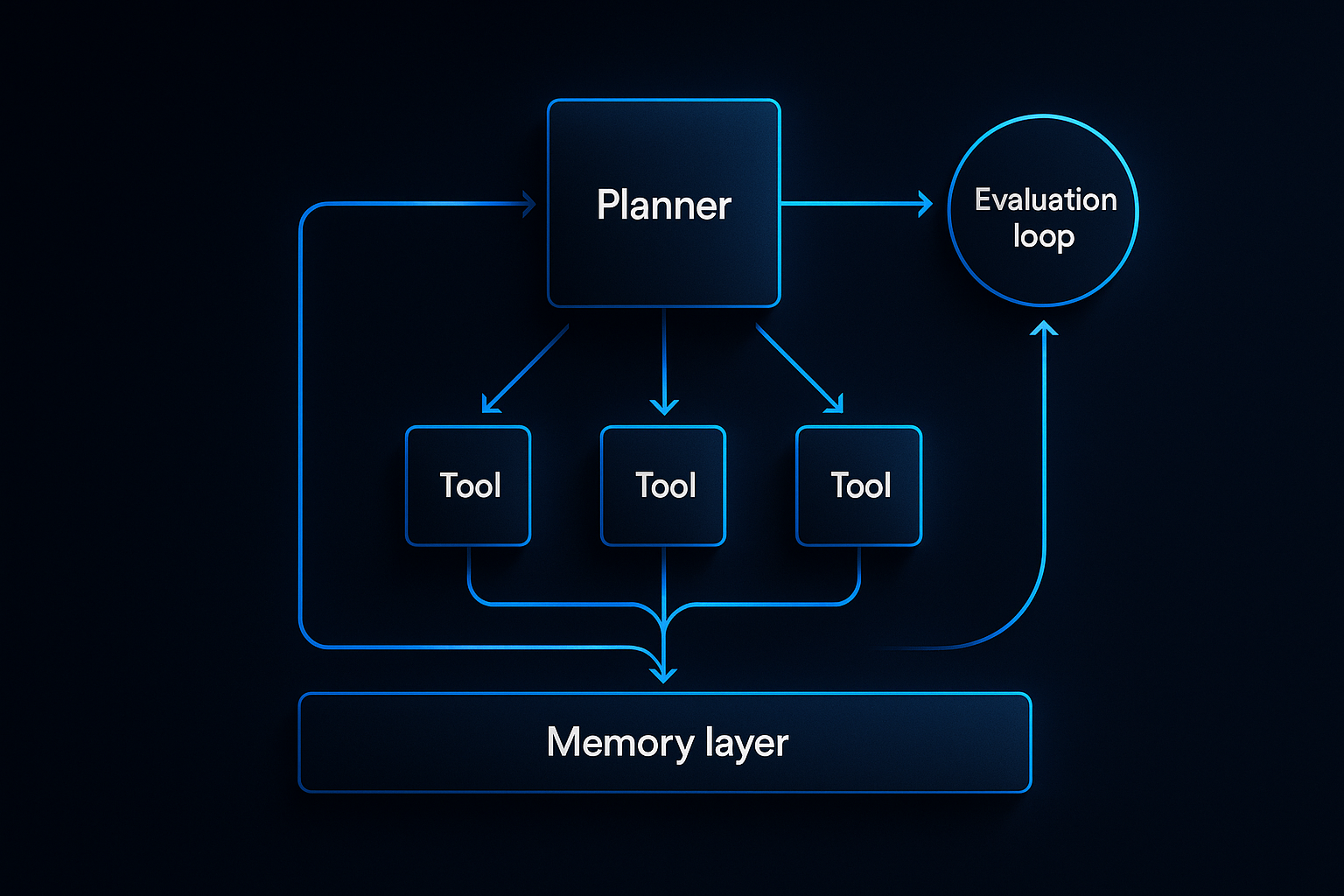
Agentic AI is no longer a research concept — it's the architecture behind the AI products actually delivering ROI in 2025. But building agent workflows that work reliably in production is a different challenge than building a demo that impresses in a pitch deck.
This guide covers what we've learned shipping agentic systems for clients across healthcare, logistics, and SaaS — including the architectural decisions that make or break production deployments.
What Is an Agentic AI Workflow?
An agentic AI workflow is a system where an LLM (or multiple LLMs) autonomously decides which tools to call, in what order, and when to stop — based on a goal rather than a fixed script.
Unlike traditional automation (where every step is explicitly coded), an agent reasons through tasks dynamically. This makes agents powerful for tasks with variable paths — and dangerous if you don't architect them carefully.
Key components of every production agent:
- Planner — The LLM that interprets the goal and decides next steps
- Tool Set — APIs, databases, and functions the agent can call
- Memory — Short-term (in-context) and long-term (vector store or database) state
- Guardrails — Constraints that prevent the agent from doing something catastrophic
- Evaluator — A mechanism to measure output quality and trigger retries
Single-Agent vs. Multi-Agent Architectures
Most teams start with a single agent and a long list of tools. This works for simple workflows but breaks down fast.
Single-agent problems at scale:
- Context windows fill up with tool call history
- Tool selection becomes unreliable with 15+ tools
- One agent handling everything creates a single point of failure
When to go multi-agent:
Switch to a multi-agent architecture when:
- Your workflow has distinct phases that require different expertise
- Tasks can run in parallel to reduce latency
- You need specialized agents with focused tool sets (a research agent, a writer agent, a validator agent)
The classic pattern: an orchestrator agent breaks down the goal and delegates to worker agents. The orchestrator never calls external tools directly — it only coordinates.
# Orchestrator pattern (simplified)
class OrchestratorAgent:
    def __init__(self, workers: dict[str, WorkerAgent]):
        self.workers = workers
        self.planner = LLM(system_prompt=ORCHESTRATOR_PROMPT)

    async def run(self, goal: str) -> str:
        plan = await self.planner.plan(goal)
        results = {}
        for step in plan.steps:
            worker = self.workers[step.agent]
            results[step.id] = await worker.execute(step.task, context=results)
        return await self.planner.synthesize(results)
The Memory Problem (And How to Solve It)
Memory is where most agent implementations fall apart in production. Here's what to use when:
| Memory Type | Storage | Use Case | Latency |
|---|---|---|---|
| In-context | LLM window | Current session, recent tool outputs | 0ms |
| Episodic | Vector DB | Past interactions, similar situations | 20-100ms |
| Semantic | Vector DB + knowledge base | Domain knowledge, policies, FAQs | 20-100ms |
| Procedural | Code / prompts | How-to knowledge, tool definitions | 0ms |
The rule: Keep in-context memory lean. An agent that summarizes its context every 5 steps outperforms one that naively appends everything.
For long-running workflows, use a hybrid: store summaries in the context window, raw history in a database, and embed key facts into a vector store for retrieval.
Tool Design: The Most Underrated Part
Your agent is only as good as its tools. Poorly designed tools are the #1 cause of agent failures we see in production.
Tool design principles:
- One tool, one job — A
search_and_summarizetool is a trap. Makesearchandsummarizeseparate. - Explicit error returns — Tools should return structured errors, not raise exceptions. The agent needs to read the error and decide what to do.
- Idempotent where possible — If an agent retries a tool call (it will), the result should be consistent.
- Input validation at the boundary — Don't trust the LLM to format inputs correctly. Validate and coerce.
@tool
def send_email(to: str, subject: str, body: str) -> dict:
    """Send an email. Returns success status and message ID."""
    if not is_valid_email(to):
        return {"success": False, "error": f"Invalid email address: {to}"}
    try:
        msg_id = email_client.send(to=to, subject=subject, body=body)
        return {"success": True, "message_id": msg_id}
    except EmailError as e:
        return {"success": False, "error": str(e)}
Guardrails: Keeping Agents in Bounds
Every production agent needs explicit boundaries. The question isn't whether to add guardrails — it's where.
Layers of protection:
- Prompt-level — Tell the agent what it cannot do. Simple but insufficient alone.
- Tool-level — Validate inputs before executing. Block obviously wrong calls.
- Output-level — Review agent outputs before surfacing to users or triggering downstream actions.
- Human-in-the-loop — For high-stakes actions (sending emails, making payments, modifying databases), require human approval before execution.
We implement a confidence scoring system for most of our production agents: if the agent's planned action scores below a threshold, it pauses and requests confirmation rather than proceeding.
Evaluation: How to Know If Your Agent Works
A common trap: testing agents with the 5 scenarios they were built for, then shipping. In production, agents encounter the scenarios you didn't think of.
Build an evaluation dataset before you build the agent. This means:
- 50+ representative tasks from your domain
- Expected outcomes (not just "should work" but specific measurable criteria)
- Edge cases and adversarial inputs
Metrics to track:
- Task completion rate — Did the agent finish the task?
- Correctness — Was the output right?
- Tool efficiency — How many tool calls did it take?
- Latency — End-to-end time per task
- Cost — Token usage per task (this compounds fast)
Run your eval suite on every model upgrade, prompt change, and tool addition. Agents regress in unexpected ways.
Production Deployment Checklist
Before shipping any agentic system:
- [ ] Evaluation dataset with 50+ test cases, automated scoring
- [ ] Maximum tool call limit per run (prevent infinite loops)
- [ ] Timeout on every tool call (stuck agents are expensive)
- [ ] Logging of every LLM call and tool call (you'll need this for debugging)
- [ ] Cost tracking per agent run
- [ ] Human-in-the-loop for irreversible actions
- [ ] Graceful degradation (if agent fails, fall back to simpler automation or human)
- [ ] Rate limiting on external tool calls
Framework Choice: LangChain, LlamaIndex, or Custom?
LangChain: Most mature, largest ecosystem. Use it if you're building quickly and want pre-built integrations. Watch out for abstraction layers that make debugging hard.
LlamaIndex: Better for knowledge-intensive workflows (RAG, document processing). Strong data connectors.
Custom (minimal framework): For production systems where you need full control. Start with the OpenAI function-calling API or Anthropic's tool use directly. Add abstractions only when you feel the pain they'd solve.
Our default: start with LangChain for prototyping, migrate critical paths to leaner custom code before shipping.
Common Failures We've Seen in Production
- The context overflow loop — Agent keeps adding context until it hits the window limit and halts. Fix: implement context pruning.
- Tool call avalanche — Agent calls 40 tools when 4 would suffice. Fix: limit tools per agent, add a planner that estimates minimum required steps.
- Hallucinated tool calls — LLM invents tool parameters that don't exist. Fix: strict JSON schema validation on all tool calls.
- Missing retry logic — API calls fail, agent gives up. Fix: exponential backoff with a max retry count on all external calls.
- The approval deadlock — Human-in-the-loop approval request gets lost, agent waits forever. Fix: timeout on approval requests, auto-escalate if no response.
Next Steps
Building a reliable agentic system takes longer than most teams expect — but the leverage it creates is real. A well-designed agent can handle work that would take a human hours, in minutes, without making the mistakes humans make at 2am.
If you're designing an agentic workflow for your business and want a team that's shipped these in production, talk to us. We'll scope the architecture in a free discovery call.
Further reading:
- How We Built a Voice AI Research Agent with VAPI — a case study on autonomous outreach
- AI Solutions at DevNexus — what we build and how
Want to Discuss This Topic?
Book a free strategy call. We’ll tell you exactly how we’d build it — scope, timeline, and what it costs.